Creating a Basic Model
To begin, we're going to create a basic
Magento Model. PHP MVC tradition insists we model a weblog post. The steps
we'll need to take are
1.
Crete a new
"Weblog" module
2.
Create a database
table for our Model
3.
Add Model information
to the config for a Model named Blogpost
4.
Add Model Resource
information to the config for the Blogpost Model
5.
Add a Read Adapter to
the config for the Blogpost Model
6.
Add a Write Adapter to
the config for the Blogpost Model
7.
Add a PHP class file
for the Blogpost Model
8.
Add a PHP class file
for the Blogpost Resource Model
9.
Instantiate the Model
Create a Weblog Module
You should be an old hat at creating empty
modules at this point, so we'll skip the details and assume you can create an
empty module named Weblog. After you've done that, we'll setup a route for an
index Action Controller with an action named "testModel". As always,
the following examples assume a Package Name of "Magentotutorial".
In Magentotutorial/Weblog/etc/config.xml,
setup the following route
<frontend>
<routers>
<weblog>
<use>standard</use>
<args>
<module>Magentotutorial_Weblog</module>
<frontName>weblog</frontName>
</args>
</weblog>
</routers>
</frontend>
<routers>
<weblog>
<use>standard</use>
<args>
<module>Magentotutorial_Weblog</module>
<frontName>weblog</frontName>
</args>
</weblog>
</routers>
</frontend>
And then add the following Action Controller
in
class Magentotutorial_Weblog_IndexController extends Mage_Core_Controller_Front_Action {
public function testModelAction() {
echo 'Setup!';
}
}
public function testModelAction() {
echo 'Setup!';
}
}
at Magentotutorial/Weblog/controllers/IndexController.php. Clear your Magento cache and load the
following URL to ensure everything's been setup correctly.
http://example.com/weblog/index/testModel
You should see the word "Setup" on a
white background.
Creating the Database Table
Magento has a system for automatically
creating and changing your database schemas, but for the time being we'll just
manually create a table for our Model.
Using the command-line or your favorite MySQL
GUI application, create a table with the following schema
CREATE TABLE `blog_posts` (
`blogpost_id` int(11) NOT NULL auto_increment,
`title` text,
`post` text,
`date` datetime default NULL,
`timestamp` timestamp NOT NULL default CURRENT_TIMESTAMP,
PRIMARY KEY (`blogpost_id`)
)
`blogpost_id` int(11) NOT NULL auto_increment,
`title` text,
`post` text,
`date` datetime default NULL,
`timestamp` timestamp NOT NULL default CURRENT_TIMESTAMP,
PRIMARY KEY (`blogpost_id`)
)
And then populate it with some data
INSERT INTO `blog_posts` VALUES (1,'My New Title','This is a blog post','2010-07-01 00:00:00','2010-07-02 23:12:30');
The Global Config and Creating The Model
There are five individual things we need to
setup for a Model in our config.
1.
Enabling Models in our
Module
2.
Enabling Model
Resources in our Module
3.
Add an
"entity" table configuration to our Model Resource.
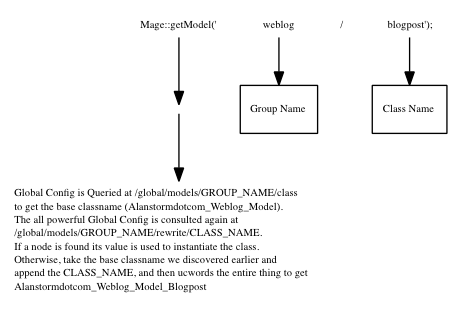
When you instantiate a Model in Magento, you
make a call like this
$model = Mage::getModel('weblog/blogpost');
The first part of the
URI you pass into get Model is the Model Group Name. Because it is a good idea to follow
conventions, this should be the (lowercase) name of your module, or to be
safeguarded agains conflicts use the packagename and modulename (also in
lowercase). The second part of the URI is the lowercase version of your Model
name.
So, let's add the following XML to our
module's config.xml.
<global>
<!-- ... -->
<models>
<weblog>
<class>Magentotutorial_Weblog_Model</class>
<!--
need to create our own resource, cant just
use core_resource
-->
<resourceModel>weblog_resource</resourceModel>
</weblog>
</models>
<!-- ... -->
</global>
<!-- ... -->
<models>
<weblog>
<class>Magentotutorial_Weblog_Model</class>
<!--
need to create our own resource, cant just
use core_resource
-->
<resourceModel>weblog_resource</resourceModel>
</weblog>
</models>
<!-- ... -->
</global>
The outer <weblog
/> tag is your Group Name, which should match your module name. <class
/> is the BASE name all Models in the weblog group will have, also calles Class Prefix. The <resourceModel /> tag indicates
which Resource Model that weblog group Models should use. There's more on this
below, but for now be content to know it's your Group Name, followed by a the
literal string "resource".
So, we're not done yet, but let's see what
happens if we clear our Magento cache and attempt to instantiate a blogpost
Model. In your testModelAction method, use the following code
public function testModelAction() {
$blogpost = Mage::getModel('weblog/blogpost');
echo get_class($blogpost);
}
$blogpost = Mage::getModel('weblog/blogpost');
echo get_class($blogpost);
}
and reload your page.
You should see an exception that looks something like this (be sure you've
turned ondeveloper mode).
include(Magentotutorial/Weblog/Model/Blogpost.php) [function.include]: failed to open stream: No such file or directory
By attempting to
retrieve a weblog/blogpost Model, you told
Magento to instantiate a class with the name
Magentotutorial_Weblog_Model_Blogpost
Magento is trying to __autoload include this
Model, but can't find the file. Let's create it! Create the following class at
the following location
File:
app/code/local/Magentotutorial/Weblog/Model/Blogpost.php
class Magentotutorial_Weblog_Model_Blogpost extends Mage_Core_Model_Abstract
{
protected function _construct()
{
$this->_init('weblog/blogpost');
}
}
{
protected function _construct()
{
$this->_init('weblog/blogpost');
}
}
Reload your page, and the exception should be
replaced with the name of your class.
All basic Models that
interact with the database should extend the Mage_Core_Model_Abstract class. This abstract class forces you to
implement a single method named _construct (NOTE: this is not PHP's constructor__construct). This method should call the class's _init
method with the same identifying URI you'll be using in the Mage::getModel method call.
The Global Config and Resources
So, we've setup our Model. Next, we need to
setup our Model Resource. Model Resources contain the code that actually talks
to our database. In the last section, we included the following in our config.
<resourceModel>weblog_resource</resourceModel>
The value in <resourceModel /> will be
used to instantiate a Model Resource class. Although you'll never need to call
it yourself, when any Model in the weblog group needs to talk to the database,
Magento will make the following method call to get the Model resource
Mage::getResourceModel('weblog/blogpost');
Again, weblog is the
Group Name, and blogpost is the Model. The Mage::getResourceModel method will use the weblog/blogpost URI to inspect the global config and pull out
the value in <resourceModel> (in this case,weblog_resource). Then, a model class will be instantiated with the following
URI
weblog_resource/blogpost
So, if you followed
that all the way, what this means is, resource models are configured in the
same section of the XML config as normal Models. This can be confusing to newcomers and
old-hands alike.
So, with that in mind, let's configure our
resource. In our <models> section add
<global>
<!-- ... -->
<models>
<!-- ... -->
<weblog_resource>
<class>Magentotutorial_Weblog_Model_Resource</class>
</weblog_resource>
</models>
</global>
<!-- ... -->
<models>
<!-- ... -->
<weblog_resource>
<class>Magentotutorial_Weblog_Model_Resource</class>
</weblog_resource>
</models>
</global>
You're adding the <weblog_resource />
tag, which is the value of the <resourceModel /> tag you just setup. The
value of <class /> is the base name that all your resource modes will
have, and should be named with the following format
Packagename_Modulename_Model_Resource
So, we have a configured resource, let's try
loading up some Model data. Change your action to look like the following
public function testModelAction() {
$params = $this->getRequest()->getParams();
$blogpost = Mage::getModel('weblog/blogpost');
echo("Loading the blogpost with an ID of ".$params['id']);
$blogpost->load($params['id']);
$data = $blogpost->getData();
var_dump($data);
}
$params = $this->getRequest()->getParams();
$blogpost = Mage::getModel('weblog/blogpost');
echo("Loading the blogpost with an ID of ".$params['id']);
$blogpost->load($params['id']);
$data = $blogpost->getData();
var_dump($data);
}
And then load the following URL in your
browser (after clearing your Magento cache)
http://example.com/weblog/index/testModel/id/1
You should see an exception something like the
following
Warning:
include(Magentotutorial/Weblog/Model/Resource/Blogpost.php) [function.include]:
failed to open stream: No such file ....
As you've likely
intuited, we need to add a resource class for our Model. Every Model has its own resource class. Add the
following class at at the following location
File:
app/code/local/Magentotutorial/Weblog/Model/Resource/Blogpost.php
class Magentotutorial_Weblog_Model_Resource_Blogpost extends Mage_Core_Model_Resource_Db_Abstract{
protected function _construct()
{
$this->_init('weblog/blogpost', 'blogpost_id');
}
}
protected function _construct()
{
$this->_init('weblog/blogpost', 'blogpost_id');
}
}
Again, the first
parameter of the init method is the URL used to identify the Model. The second parameter is the database field
that uniquely identifies any particular column. In most cases, this should be
the primary key. Clear your cache, reload, and you should see
Can't
retrieve entity config: weblog/blogpost
Another exception!
When we use the Model URI weblog/blogpost,
we're telling Magento we want the Model Group weblog, and the blogpost Entity. In the context of simple Models that extendMage_Core_Model_Resource_Db_Abstract, an entity corresponds to a table. In this
case, the table namedblog_post that we created above.
Let's add that entity to our XML config.
<models>
<!-- ... --->
<weblog_resource>
<class>Magentotutorial_Weblog_Model_Resource</class>
<entities>
<blogpost>
<table>blog_posts</table>
</blogpost>
</entities>
</weblog_resource>
</models>
<!-- ... --->
<weblog_resource>
<class>Magentotutorial_Weblog_Model_Resource</class>
<entities>
<blogpost>
<table>blog_posts</table>
</blogpost>
</entities>
</weblog_resource>
</models>
We've added a new <entities /> section
to the resource Model section of our config. This, in turn, has a section named
after our entity (<blogpost />) that specifies the name of the database
table we want to use for this Model.
Clear your Magento cache, cross your fingers,
reload the page and ...
Loading
the blogpost with an ID of 1
array
'blogpost_id' => string '1' (length=1)
'title' => string 'My New Title'
(length=12)
'post' => string 'This is a blog post'
(length=19)
'date' => string '2009-07-01 00:00:00'
(length=19)
'timestamp' => string '2009-07-02
16:12:30' (length=19)
Eureka! We've managed to extract our data and,
more importantly, completely configure a Magento Model.
Basic Model Operations
All Magento Models inherit
from the the Varien_Object class. This class is part of the Magento system
library andnot part of any Magento
core module. You can find this object at
lib/Varien/Object.php
Magento Models store
their data in a protected _data property. The Varien_Object class gives us
several methods we can use to extract this data. You've already seen getData, which will return an array of key/value
pairs. This method can also be passed a string key to get a specific field.
$model->getData();
$model->getData('title');
$model->getData('title');
There's also a getOrigData method, which will
return the Model data as it was when the object was initially populated,
(working with the protected _origData method).
$model->getOrigData();
$model->getOrigData('title');
$model->getOrigData('title');
The Varien_Object also
implements some special methods via PHP's magic __call method. You can get, set, unset, or check for the existence of
any property using a method that begins with the word get, set, unset or has
and is followed by the camel cased name of a property.
$model->getBlogpostId();
$model->setBlogpostId(25);
$model->unsetBlogpostId();
if($model->hasBlogpostId()){...}
$model->setBlogpostId(25);
$model->unsetBlogpostId();
if($model->hasBlogpostId()){...}
For this reason, you'll want to name all your
database columns with lower case characters and use underscores to separate
characters.
CRUD, the Magento Way
Magento Models support
the basic Create, Read, Update, and Delete functionality of CRUD with load, save, anddelete methods. You've
already seen the load method in action. When passed a single parameter, the
load method will return a record whose id field (set in the Model's resource)
matches the passed in value.
$blogpost->load(1);
The save method will allow you to both INSERT
a new Model into the database, or UPDATE an existing one. Add the following
method to your Controller
public function createNewPostAction() {
$blogpost = Mage::getModel('weblog/blogpost');
$blogpost->setTitle('Code Post!');
$blogpost->setPost('This post was created from code!');
$blogpost->save();
echo 'post with ID ' . $blogpost->getId() . ' created';
}
$blogpost = Mage::getModel('weblog/blogpost');
$blogpost->setTitle('Code Post!');
$blogpost->setPost('This post was created from code!');
$blogpost->save();
echo 'post with ID ' . $blogpost->getId() . ' created';
}
and then execute your Controller Action by
loading the following URL
http://example.com/weblog/index/createNewPost
You should now see an additional saved post in
you database table. Next, try the following to edit your post
public function editFirstPostAction() {
$blogpost = Mage::getModel('weblog/blogpost');
$blogpost->load(1);
$blogpost->setTitle("The First post!");
$blogpost->save();
echo 'post edited';
}
$blogpost = Mage::getModel('weblog/blogpost');
$blogpost->load(1);
$blogpost->setTitle("The First post!");
$blogpost->save();
echo 'post edited';
}
And finally, you can delete your post using
very similar syntax.
public function deleteFirstPostAction() {
$blogpost = Mage::getModel('weblog/blogpost');
$blogpost->load(1);
$blogpost->delete();
echo 'post removed';
}
$blogpost = Mage::getModel('weblog/blogpost');
$blogpost->load(1);
$blogpost->delete();
echo 'post removed';
}
Model Collections
So, having a single
Model is useful, but sometimes we want to grab list of Models. Rather than
returning a simple array of Models, each Magento Model type has a unique
collection object associated with it. These objects implement the PHP
IteratorAggregate and Countable interfaces, which means they can be passed to
the countfunction, and used in for each constructs.
We'll cover Collections in full in a later
article, but for now let's look at basic setup and usage. Add the following
action method to your Controller, and load it in your browser.
public function showAllBlogPostsAction() {
$posts = Mage::getModel('weblog/blogpost')->getCollection();
foreach($posts as $blogpost){
echo '<h3>'.$blogpost->getTitle().'</h3>';
echo nl2br($blogpost->getPost());
}
}
$posts = Mage::getModel('weblog/blogpost')->getCollection();
foreach($posts as $blogpost){
echo '<h3>'.$blogpost->getTitle().'</h3>';
echo nl2br($blogpost->getPost());
}
}
Load the action URL,
http://example.com/weblog/index/showAllBlogPosts
and you should see a (by now) familiar
exception.
Warning:
include(Magentotutorial/Weblog/Model/Resource/Blogpost/Collection.php)
[function.include]: failed to open stream
You're not surprised,
are you? We need to add a PHP class file that defines our Blogpost collection.
Every Model has a protected property named _resourceCollectionName that contains a URI that's used to identify
our collection.
protected '_resourceCollectionName' => string 'weblog/blogpost_collection'
By default, this is the same URI that's used
to identify our Resource Model, with the string "_collection"
appended to the end. Magento considers Collections part of the Resource, so
this URI is converted into the class name
Magentotutorial_Weblog_Model_Resource_Blogpost_Collection
Add the following PHP class at the following
location
File:
app/code/local/Magentotutorial/Weblog/Model/Resource/Blogpost/Collection.php
class Magentotutorial_Weblog_Model_Resource_Blogpost_Collection extends Mage_Core_Model_Resource_Db_Collection_Abstract {
protected function _construct()
{
$this->_init('weblog/blogpost');
}
}
protected function _construct()
{
$this->_init('weblog/blogpost');
}
}
Just as with our other classes, we need to
init our Collection with the Model URI. (weblog/blogpost). Rerun your
Controller Action, and you should see your post information.

No comments:
Post a Comment